Senin, 15 November 2010

Apple to Announce Something “You'll Never Forget” Tomorrow

Apple has just updated the status over Apple's official website with a very interesting message.


Tomorrow is just another day.

That you’ll never forget.

Check back here tomorrow for an exciting announcement from iTunes.
So, what should we expect Apple? the much waited iTunes cloud? iOS 4.2 release? App Store of the new Apple TV? or just text and screenshots? Anyway, we’ll check back tomorrow at 7 AM PST (check your local time here)

PS Jailbreak Gets Support for PS3 Firmware 3.42, 3.50 and Beyond!

Guys over PS Jailbreak has just announced that PS Jailbreak Mod Chip now supports firmware 3.42, 3.50 and beyond. The PlayStation 3 firmware version 3.50 was supposed to be the one to really protect the console but PS Jailbreak gets support for this one.

We already have full how to guide to jailbreak your PS3 using PS Jailbreak Mod Chip so you can create backups of the original disks. Moreover, you can jailbreak your PS3 with Android phone using PSFreedom. Anyway, Sony must start a new safe firmware!

Windows Phone 7 Jailbreak First Step [Video]

Yesterday we reported about the Australian developer, Chris Walshie who is working hard to develop a way to jailbreak WP7 as well as he was successfully able to prove a method to run "native unmanaged code" on a retail Windows Phone 7 device. Let's check out this in action.


I’ll be posting the code in a couple of days, need to clean it all up. And yes, it’s a managed app running unmanaged code :)

You’ve got FULL access, create, delete, browse files etc. Just can’t delete system ROM files, IE coredll.dll (obviously).

I would imagine that we'll see the new third-party jailbreak store apps very soon, as the developers won't find the complexities such as those on iOS Jailbreak. What do you think?

[UPDATE RC2] RC2iREB 4.1, iTunes Restore Errors Bypasser, is Out to Support all Devices

iREB is a must have tool for iOS users works under Windows machines which lets you put your device into a pwned state so that you will be able to upload custom firmware to it. iH8sn0w has just released iREB 4.1, the iTunes restore error bypasser to support all new & old devices.

Supported Devices:
DonloadLink Below:

  • iPhone 2G
  • iPhone 3G
  • iPhone 3G[S] (old & new bootrom)
  • iPhone 4
  • iPod Touch 1G
  • iPod Touch 2G (MB & MC)
  • iPod Touch 3G
  • iPod Touch 4
  • iPad
  • Apple TV 2

Just download iREB from the link at the end of the page, and follow our guide posted here to cook your custom firmware with Sn0wbreeze for Windows and follow our guide posted here to do the same with PwnageTool for Mac. Then use iREB to put your device into DFU mode and install your cooked firmware (you'll not get iTunes errors with iREB). Also keep in mind that iREB only works on iTunes 10 or above.
Download iReb

Sabtu, 13 November 2010

Can I Unlock ?

http://caniunlock.com/
Here's the deal: if @ released a update to the Bootlace app, for iPod touch 2G users by tomorrow, I will release a unlock.

I´ve updated LimeRa1n


My hosting company says limera1n was generating too many connection requests. Now
there's 3 less.


[UPDATE]-HowTo JailBreak-Download Sn0wbreeze 2.1 to Jailbreak iOS 4.1 / 3.2.2 on iPhone 4 / 3GS , iPod Touch 4G / 3G and iPad

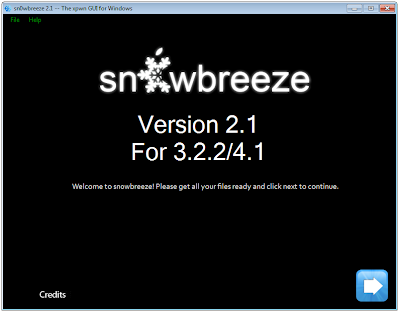
Sn0wbreeze 2.1 has been released few moments ago, this tool also know as PwnageTool for Windows, this version will jailbreak iOS 4.1 on iPhone 4G, iPhone 3GS / 3G, iPod touch 4G / 3G and iOS 3.2.2 on iPad.

Supported Devices
DownloadLink Below and HOW TO JailBreak Tutorial with Sn0wBreeze 2.1:
  • iPad
  • iPhone 3G
  • iPhone 3G[S] (old bootrom & new bootrom)
  • iPhone 4
  • iPod Touch 2G (MB & MC)
  • iPod Touch 3G
  • iPod Touch 4
  • Apple TV 2
    This tool will be valuable for who need to upgrade to version iOS 4.1 with preserving the unlockable baseband to be able to use existing version of ultrasn0w, as Sn0wbreeze cook a pre-jailbroken custom firmware.

    As usual we will prepare the full guide to jailbreak iOS 4.1 on all supported devices very soon, keep your eyes opened.

    Download Sn0wbreeze 2.1 for Windows
    Download iOS 4.1 for iPhone and iPod touch
    Download iOS 3.2.2 for iPad
    Download iTunes 10.1


    Steps-How TO:
    STEP 1: Download iTunes 10.1 (or iTunes 10) from the links at the bottom of post.

    STEP 2: Now start iTunes and sync your iPhone with your PC so that it backs-up all your important data including settings, apps, music, contacts and photos.

    STEP 3: Download Sn0wbreeze 2.1 (links at the bottom of post) and move all these files on the desktop.

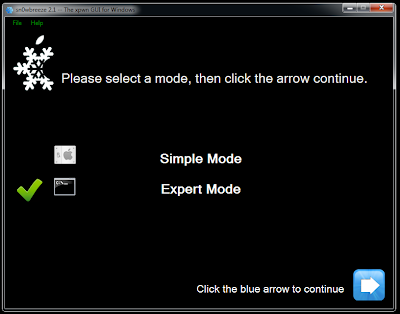
    STEP 4: Launch Sn0wbreeze (please note that when used windows 7 or vista, you need to start your application in administrator mode, by clicking the right mouse button on the icon and selecting "Run as administrator") then select Expert Mode and click on the blue arrow.


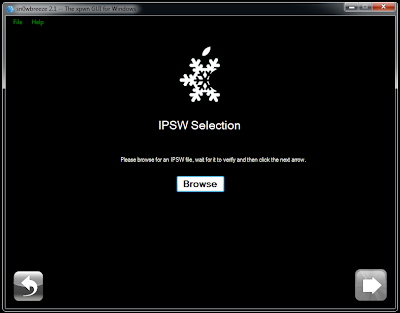
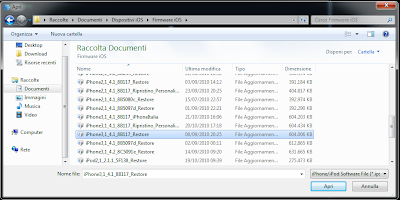
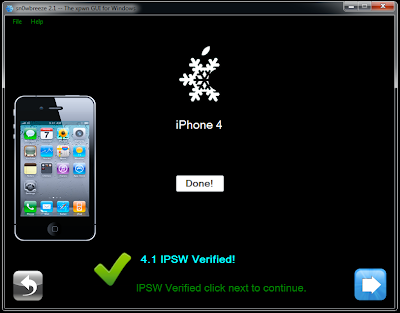
    STEP 5: Now, point Sn0wbreeze to the original firmware (downloads at the bottom) by clicking on Browse and select it as below:


    STEP 6: Once your device is recognized, hit the blue arrow.

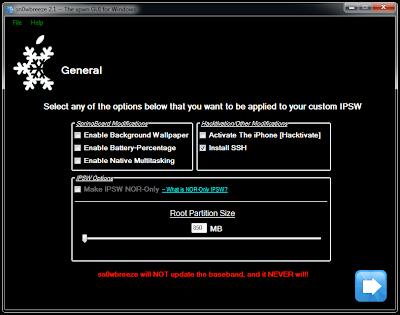
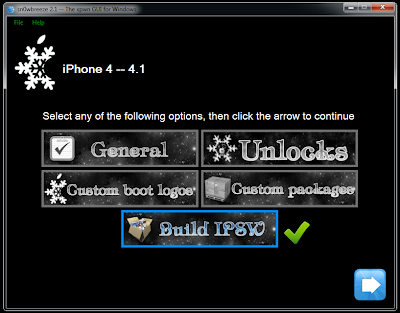
    STEP 7: Click on General, and check on Activate the iPhone [Hacktivate] if you are on unofficial carrier and want to hacktivate your phone by Sn0wbreeze.

    Other items are optional, depends on your choices. You can't install Ultrasn0w automatically due to some problems between the developer of Sn0wbreeze and the iPhone Dev Team.

    STEP 8: At the end, hit Build IPSW to start creating your firmware.

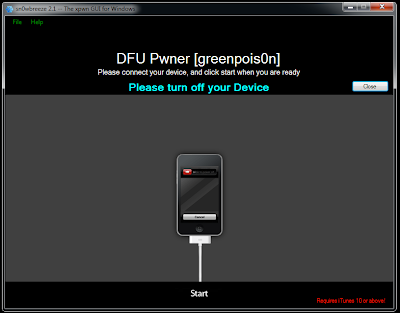
    STEP 9: Once you finished, you have to put your device in DFU mode. Sn0wbreeze will help you with that.

    STEP 10: Now iTunes will detect will detect your device in recovery mode. To install the new firmware, you have to restore using the cooked firmware by clicking on the iPhone icon on the left sidebar of iTunes then hold left “alt” button (“shift” button on Windows) on the keyboard and then click on “Restore” then release the alt button, now select the custom firmware created by Sn0wbreeze and let iTunes go in a bunch of steps.

    STEP 11: Well done, now you can unlock your iPhone 4, iPhone 3GS, iPhone 3G using the latest version of Ultrasn0w by following the step by step guide posted here.

    In case you got any problems with the guide, we would like to hear from you by commenting in the comment section below.
    For more news coverage, you can follow us on Twitter or become a fan on our Facebook page, we will keep you updated with posts over the web.